

Published by RyDesk | WordPress Website Design, Development & Speed Optimization
Imagine visiting a website to find a service, purchase a product, or read an article. You click the link, but the page takes several seconds to load. You wait, click again, and still nothing happens. What do you do? Most likely, you leave and visit another website.
This is exactly why website speed matters. A slow website doesn’t just frustrate visitors; it can affect your search visibility, conversions, user experience, and business growth.
For startups and small businesses, website performance is especially important because every visitor is a potential customer. A fast-loading website makes it easier for people to explore your services, find information, and take action.
The short version: website speed improves the experience visitors have on your website, supports SEO performance, reduces friction in the customer journey, and helps your business compete online. This guide explains why website speed is important, what makes websites slow, and how to improve performance.
Quick Answer
- User experience: Fast websites help visitors access information and navigate pages without unnecessary waiting.
- SEO performance: Google considers Core Web Vitals as part of its page experience systems, making performance an important technical SEO consideration.
- Conversions: Faster pages can reduce friction during shopping, form submissions, and other important actions.
- Mobile experience: Optimized websites provide smoother browsing across smartphones and tablets.
- Customer trust: Reliable performance helps create a professional first impression.
- Business growth: Better performance supports your digital marketing and customer acquisition efforts.
Think of website speed like the service at a physical store. If customers have to wait too long before someone helps them, they may leave. A fast website works like an efficient store where customers can quickly find what they need and complete their purchases.
What Is Website Speed?
Website speed refers to how quickly a website loads its content and becomes usable after someone visits a page.
It includes more than the time required for a page to appear on the screen. It also considers how quickly users can interact with the website and whether the page layout remains stable while loading.
Website speed is generally evaluated through several performance metrics:
- Loading performance: How quickly the main content appears.
- Responsiveness: How quickly the website reacts when users click or interact with elements.
- Visual stability: Whether content unexpectedly moves while the page loads.
A website might display its main content quickly but still feel slow if buttons are unresponsive or elements keep shifting.
That’s why modern website performance focuses on the complete user experience rather than just one loading-time number.
Why Is Website Speed Important? 7 Key Reasons
Website speed affects different parts of your online business. Here are seven important reasons why you should prioritize it.
1. Website Speed Improves User Experience
User experience is one of the biggest reasons website speed is important.
Visitors expect websites to load quickly and provide easy access to information. When pages take too long to respond, users become frustrated and may leave before exploring your content.
For example, imagine a potential customer visiting your website to learn about your services. If the homepage loads slowly, service images take too long to appear, and navigation feels unresponsive, that visitor may choose a competitor.
A fast website helps visitors:
- Access important information quickly.
- Navigate between pages smoothly.
- Interact with buttons and forms easily.
- Browse products and services without interruptions.
- Enjoy a consistent experience across devices.
The goal is to remove unnecessary delays so visitors can focus on what your business offers.
2. Website Speed Supports SEO and Google Rankings
Website speed is an important consideration in technical SEO.
Google uses page experience signals, including Core Web Vitals, to evaluate aspects of website performance. These metrics help measure loading speed, responsiveness, and visual stability.
The three Core Web Vitals are:
|
Metric |
What It Measures |
Good Score |
|
LCP |
How quickly the largest visible content loads |
2.5 seconds or less |
|
INP |
How quickly a page responds to user interactions |
Below 200 milliseconds |
|
CLS |
How much unexpected layout movement occurs |
Below 0.1 |
A website that performs well across these metrics provides a better experience for visitors.
However, website speed is not the only Google ranking factor. Search engines also consider content relevance, quality, backlinks, technical structure, and many other signals.
This means improving speed alone does not guarantee higher rankings, but poor performance can create additional obstacles for your SEO strategy.
If you want a website designed with both performance and search visibility in mind, explore our SEO Web Design Services.
3. Faster Websites Can Improve Conversion Rates
Website speed can influence whether visitors complete important actions.
Consider an online store where customers browse products, add items to their carts, and proceed to checkout. If product pages load slowly or checkout buttons respond with delays, customers may abandon their purchases.
The same problem can happen on business websites.
A visitor might want to:
- Request a service quotation.
- Submit a contact form.
- Book an appointment.
- Purchase a product.
- Download a resource.
Every unnecessary delay creates friction in the process.
A faster website can make these interactions smoother and help visitors complete their intended actions.
For businesses investing in paid advertising, this is particularly important. You may spend money attracting visitors, but if your landing page performs poorly, some of that investment can be wasted.
The objective is not simply to attract more traffic. It is to make your website effective at converting that traffic into meaningful business results.
4. Website Speed Reduces Bounce Rate
A slow website can encourage visitors to leave before they explore other pages.
For example, someone searches Google for a website development service and clicks your result. If the page takes too long to load, they may return to Google and visit another website.
This behavior can increase the number of visitors who leave after viewing only one page.
Improving website performance can help reduce unnecessary waiting and encourage users to continue browsing.
However, bounce rate is not always a negative metric. Someone may visit a blog, find the exact answer they need, and leave satisfied.
Therefore, website speed should be improved alongside relevant content, clear navigation, and useful page information.
If your website has recently become slower, read our guide on Why Is My Website Suddenly Slow? to understand common performance problems and possible fixes.
5. Mobile Users Need Faster Websites
Mobile performance is another important reason to optimize website speed.
Many visitors access business websites through smartphones rather than desktop computers. They may be using mobile data, older devices, or connections with inconsistent speeds.
A website that performs well on desktop may still have problems on mobile.
Common mobile performance issues include:
- Oversized images that take too long to load.
- Heavy animations and unnecessary scripts.
- Poorly optimized mobile layouts.
- Buttons that respond slowly.
- Intrusive pop-ups that interrupt browsing.
- Large page sizes that consume unnecessary data.
To improve mobile performance, businesses should use responsive layouts, optimized images, efficient scripts, and appropriate caching.
A mobile-friendly website should not only look good on a smaller screen; it should also remain fast and easy to use.
6. Website Speed Builds Customer Trust
Your website is often the first interaction someone has with your business.
A slow website with broken elements, delayed buttons, and unexpected layout changes may create a negative impression.
On the other hand, a fast and reliable website helps visitors interact with your business more confidently.
Website performance supports trust by helping ensure that:
- Important pages load consistently.
- Contact forms work properly.
- Navigation remains responsive.
- Product information is accessible.
- The website works smoothly across devices.
Speed alone does not guarantee customer trust. Security, professional design, accurate information, and good customer support are also important.
However, performance is one of the basic elements of a professional online experience.
7. Website Speed Helps Your Business Stay Competitive
Your competitors are also working to improve their online presence.
If two businesses offer similar products or services, visitors may prefer the website that provides a smoother experience and makes information easier to access.
A slow website can create unnecessary obstacles, especially when potential customers are comparing several businesses.
Website optimization can help you:
- Deliver a smoother browsing experience.
- Support your digital marketing campaigns.
- Improve landing page performance.
- Make your website more accessible on mobile devices.
- Handle website traffic more efficiently.
- Support long-term business growth.
For startups and small businesses, website performance should be part of the overall digital strategy, not something considered only after problems appear.
What Makes a Website Slow?
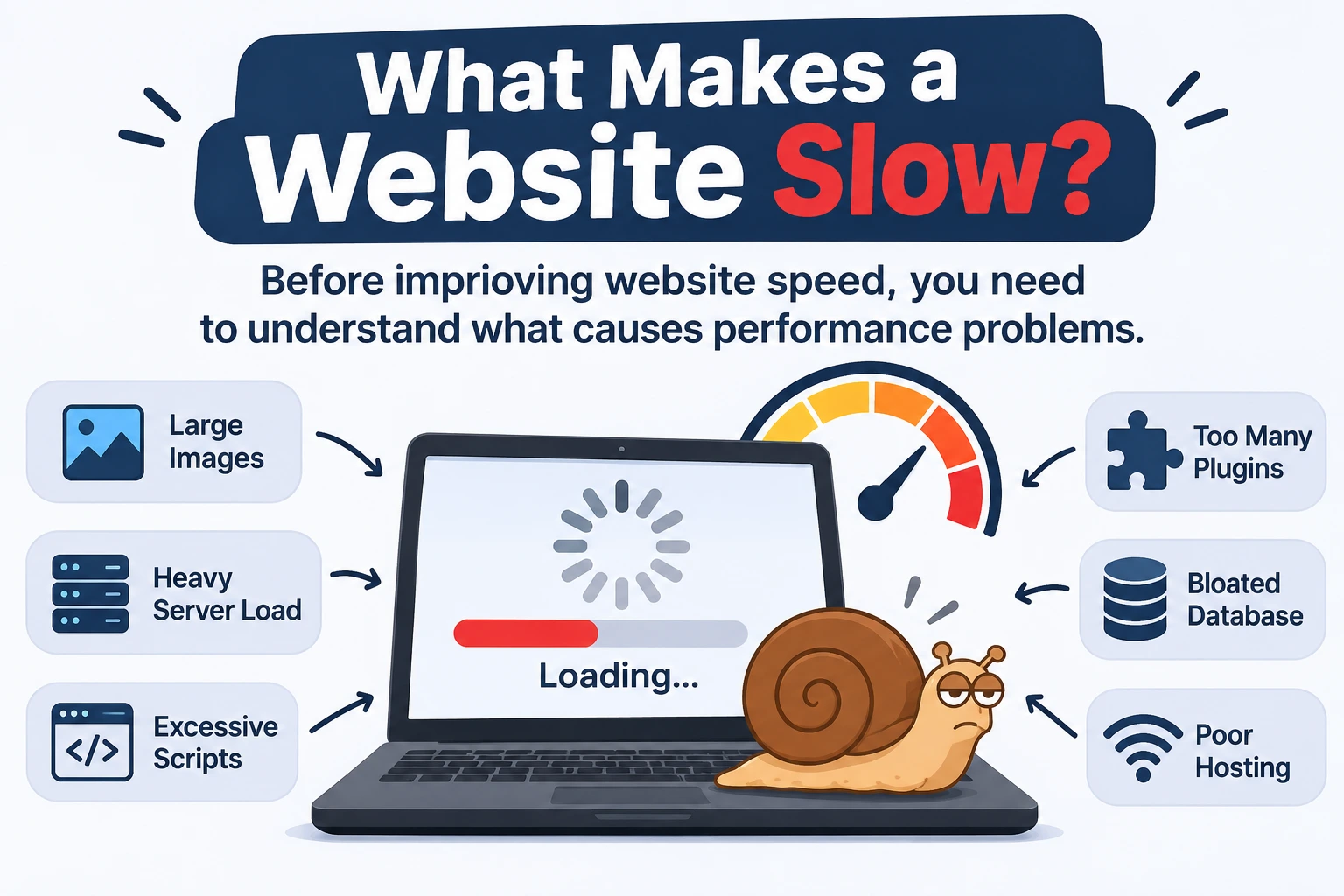
Before improving website speed, you need to understand what causes performance problems.
Here are some common reasons websites load slowly.
1. Unoptimized Images
Large image files are among the most common causes of slow-loading pages.
For example, uploading a 3 MB image when a properly compressed 150 KB image would provide sufficient visual quality adds unnecessary page weight.
Solution: Resize images according to their display dimensions, compress them, use WebP or AVIF where appropriate, and implement lazy loading for images that are not immediately visible.
2. Poor Web Hosting
Your hosting environment affects how quickly your website server responds to visitors.
Limited server resources, poor configurations, and unsuitable hosting plans can contribute to slow performance.
Solution: Choose reliable hosting with sufficient resources for your website’s traffic and technical requirements.
3. Too Many WordPress Plugins
WordPress plugins add functionality, but some can introduce unnecessary scripts, stylesheets, database queries, and processing requirements.
The problem is not simply the number of plugins. Plugin quality and the resources they use matter more.
Solution: Review your installed plugins regularly and remove unnecessary or inefficient extensions.
4. Unoptimized CSS and JavaScript
Large CSS and JavaScript files can delay page rendering and user interactions.
Unnecessary animations, third-party scripts, and unused code can also affect performance.
Solution: Minify files, remove unused code, and defer or delay non-critical scripts where appropriate.
5. Lack of Website Caching
Without proper caching, your server may repeatedly process the same requests instead of delivering previously generated content.
This can increase server workload and slow down page delivery.
Solution: Configure browser caching, page caching, and other suitable caching mechanisms based on your website setup.
6. Poor Database Optimization
WordPress websites can accumulate unnecessary database information over time, including old revisions, expired transients, and unused data.
This can contribute to unnecessary database overhead.
Solution: Perform regular database maintenance and remove unnecessary data carefully after creating a backup.
7. Heavy Themes and Page Builders
Some themes and page builders load additional CSS, JavaScript, animations, and other resources that increase page size.
A website with unnecessary design elements may become difficult to optimize.
Solution: Use lightweight themes, avoid unnecessary widgets, and optimize the structure of your pages.
If these problems are affecting your website, our Website Speed Optimization Services can help identify performance bottlenecks and apply suitable technical improvements.
Website Speed vs Website Performance: What’s the Difference?
Website speed and website performance are closely related, but they are not exactly the same.
Website speed mainly refers to how quickly pages load. Website performance covers the broader experience, including responsiveness, stability, resource usage, and overall functionality.
|
Comparison |
Website Speed |
Website Performance |
|
Main focus |
Loading time |
Overall website experience |
|
Measures |
Content loading |
Loading, responsiveness, stability |
|
Main concern |
How quickly pages appear |
How well the website works |
|
Example |
Page loads in 2 seconds |
Page loads quickly and buttons respond smoothly |
|
Improvement methods |
Image compression, caching |
Speed optimization, code cleanup, UX improvements |
A website can load quickly but still perform poorly if its buttons are unresponsive or its layout keeps shifting.
That’s why a complete optimization strategy should address both loading speed and overall performance.
How to Check Your Website Speed
You don’t need to guess whether your website is fast or slow. Several tools can help you measure its performance.
Here are three useful options:
1. Google PageSpeed Insights
Google PageSpeed Insights analyzes website performance on mobile and desktop devices.
It provides performance scores, Core Web Vitals information when available, and recommendations for improving loading speed.
Website: https://pagespeed.web.dev/
2. GTmetrix
GTmetrix provides detailed performance reports, including page loading behavior, page size, and optimization recommendations.
It can help identify large files, inefficient resources, and other performance problems.
Website: https://gtmetrix.com/
3. Google Search Console
Google Search Console provides a Core Web Vitals report based on real-world user experience data.
It helps website owners identify groups of URLs with performance issues and monitor improvements over time.
Website: https://search.google.com/search-console/
Important: Don’t focus only on achieving a perfect performance score. Prioritize improvements that make your website faster, more responsive, and easier for real visitors to use.
How to Improve Website Speed
Once you identify the performance issues, you can start making improvements.
Here are some effective website speed optimization techniques:
|
Optimization Method |
How It Helps |
|
Image compression |
Reduces image file sizes |
|
Browser caching |
Reduces repeated resource downloads |
|
CDN integration |
Delivers static assets from geographically closer servers |
|
CSS optimization |
Reduces unnecessary styling resources |
|
JavaScript optimization |
Improves rendering and responsiveness |
|
Database cleanup |
Removes unnecessary database information |
|
Quality hosting |
Supports faster server responses |
|
Plugin optimization |
Reduces unnecessary WordPress overhead |
|
Lazy loading |
Delays loading of off-screen images and content |
These techniques should be implemented carefully because aggressive optimization can sometimes break website layouts or functionality.
For WordPress websites, performance improvements should be tested after each major change.
Why Choose RyDesk for Website Speed Optimization?
A fast website requires more than installing a caching plugin. You need to identify the actual performance problems and apply the right technical solutions.
At RyDesk, we specialize in WordPress website development and speed optimization for startups and small businesses.
Our website speed optimization approach includes:
- Analyzing website loading performance and server response delays.
- Optimizing Core Web Vitals, including LCP, INP, and CLS.
- Compressing and resizing images.
- Optimizing CSS and JavaScript.
- Configuring advanced caching.
- Cleaning unnecessary database data.
- Identifying inefficient WordPress plugins.
- Improving mobile website performance.
- Testing website functionality after optimization.
We focus on improving performance while protecting your website’s existing design, content, and functionality.
Our approach is designed for businesses that want a faster WordPress website without unnecessarily rebuilding their entire online presence.
Explore our Website Speed Optimization Services to see how we can help improve your website performance.
Long-Term Website Speed Maintenance
Website speed optimization is not always a one-time task.
Your website may become slower over time because of:
- New plugin installations and updates.
- Additional images and videos.
- Changes to themes and page builders.
- Increased website traffic.
- New third-party scripts.
- Database growth.
- Hosting or server configuration changes.
This is why regular performance monitoring is important.
A good maintenance routine should include:
|
Maintenance Task |
Recommended Frequency |
|
Website speed testing |
Monthly |
|
Plugin and theme review |
Monthly |
|
Image optimization |
Whenever new images are uploaded |
|
Database cleanup |
Periodically, based on website needs |
|
Core Web Vitals monitoring |
Monthly |
|
Backup verification |
Regularly |
|
Technical performance audit |
Quarterly or after major changes |
The exact frequency depends on your website’s complexity, traffic, and business requirements.
If you want to keep your website secure, updated, and performing properly, explore our WordPress Maintenance Services.
Frequently Asked Questions
Why is website speed important for SEO?
Website speed supports user experience and is considered through Google’s page experience systems, including Core Web Vitals. A faster website can provide a smoother experience, but speed alone does not guarantee higher Google rankings.
What is a good website loading speed?
There is no single loading-time target for every website. Google recommends an LCP of 2.5 seconds or less, an INP below 200 milliseconds, and a CLS score below 0.1 for good Core Web Vitals performance.
Does website speed affect conversions?
Yes. Slow-loading pages can frustrate visitors and create unnecessary delays during purchases, form submissions, and other important actions. Improving performance can help reduce friction in the customer journey.
Can website speed affect mobile users?
Yes. Slow-loading images, heavy scripts, and poorly optimized layouts can negatively affect mobile performance. Optimizing website resources and using responsive designs can improve the mobile experience.
How can I check my website speed?
You can use Google PageSpeed Insights, GTmetrix, and Google Search Console to evaluate website performance, identify issues, and monitor Core Web Vitals.
Can WordPress plugins slow down a website?
Yes. Some WordPress plugins introduce additional scripts, database queries, and server processing requirements. Removing unnecessary plugins and replacing inefficient extensions can help improve performance.
Does website speed affect bounce rate?
A slow website can encourage visitors to leave before exploring other pages. Improving loading performance can reduce unnecessary waiting, although bounce rate also depends on content quality and visitor intent.
How often should I optimize my website speed?
You should monitor performance regularly, especially after installing plugins, updating themes, uploading large images, or making significant website changes. Monthly checks are a useful starting point for many business websites.
The Bottom Line
Website speed is not just a technical detail. It is an important part of creating a successful online business.
A fast website helps visitors access information, navigate pages, interact with your business, and complete important actions. It also supports your SEO strategy, mobile usability, customer trust, and overall website performance.
Ignoring website speed can create unnecessary problems, while regular optimization helps your website remain fast, stable, and user-friendly.
You don’t need to rebuild your entire website to improve performance. Start by identifying the biggest bottlenecks, optimizing important resources, and monitoring your results.
At RyDesk, we help startups and small businesses build and optimize high-performance WordPress websites. Our focus is simple: better website performance, SEO-friendly development, and smoother user experiences.
If your website is loading slowly or struggling with Core Web Vitals, explore our Website Speed Optimization Services and take the next step toward a faster website.