

Your checkout page decides whether you get paid.
You can run ads.
You can drive traffic.
You can optimize product pages.
But if your payment gateway fails, slows down, or feels insecure, customers abandon instantly.
In ecommerce, trust lives at checkout.
This Payment Gateway Integration Guide explains everything you need to know — from selecting the right provider to technical implementation, compliance, testing, and optimization.
If you run or plan to launch an ecommerce business in the USA, this guide will give you complete clarity.
What Is a Payment Gateway?
A payment gateway is the technology that:
- Collects customer payment details
- Encrypts sensitive information
- Sends data to the acquiring bank
- Receives approval or decline response
- Confirms the transaction
It acts as the secure bridge between your website, the customer’s bank, and your merchant account.
Without it, your website cannot process online payments.
How Payment Gateway Processing Actually Works
Understanding the flow helps you implement it correctly.
Here is what happens during a typical transaction:
- Customer enters card details on checkout.
- The gateway encrypts the data.
- It sends the request to the payment processor.
- The processor contacts the issuing bank.
- The bank approves or declines.
- The result returns to your website within seconds.
All of this happens in 2–5 seconds.
If the process feels slow or unstable, users lose confidence.
Types of Payment Gateway Integration
You can integrate gateways in three main ways:
Hosted payment gateway
The user gets redirected to the gateway’s secure page (easier to implement, less customization).
Self-hosted integration
The customer enters details on your site, but the gateway processes securely behind the scenes.
API-based full integration
You build a fully customized checkout experience using the gateway’s API.
For small businesses, API-based or embedded checkout offers better user experience and branding control.
Businesses investing in structured ecommerce growth often integrate gateways during development through professional Ecommerce Website Development services to ensure stability, compliance, and performance from day one.
Choosing the Right Payment Gateway
Not all gateways suit every business.
When selecting one, evaluate:
- Transaction fees
- Monthly charges
- Supported payment methods
- International support
- Settlement time
- Fraud detection tools
- API documentation quality
- Mobile optimization
Common providers in the USA include Stripe, PayPal, Authorize.net, and Square.
But your choice depends on your business model, product type, and scaling plans.
PCI Compliance and Security Requirements
Security is not optional.
When handling card payments, you must comply with PCI DSS (Payment Card Industry Data Security Standard).
PCI compliance requires:
- Secure data transmission
- Encrypted storage
- Firewall protection
- Access control
- Regular vulnerability scans
You can review official PCI standards here.
If you use hosted gateways, the provider handles most compliance responsibilities.
If you use API-based integration, you share responsibility.
Ignoring compliance exposes your business to fines and reputational damage.
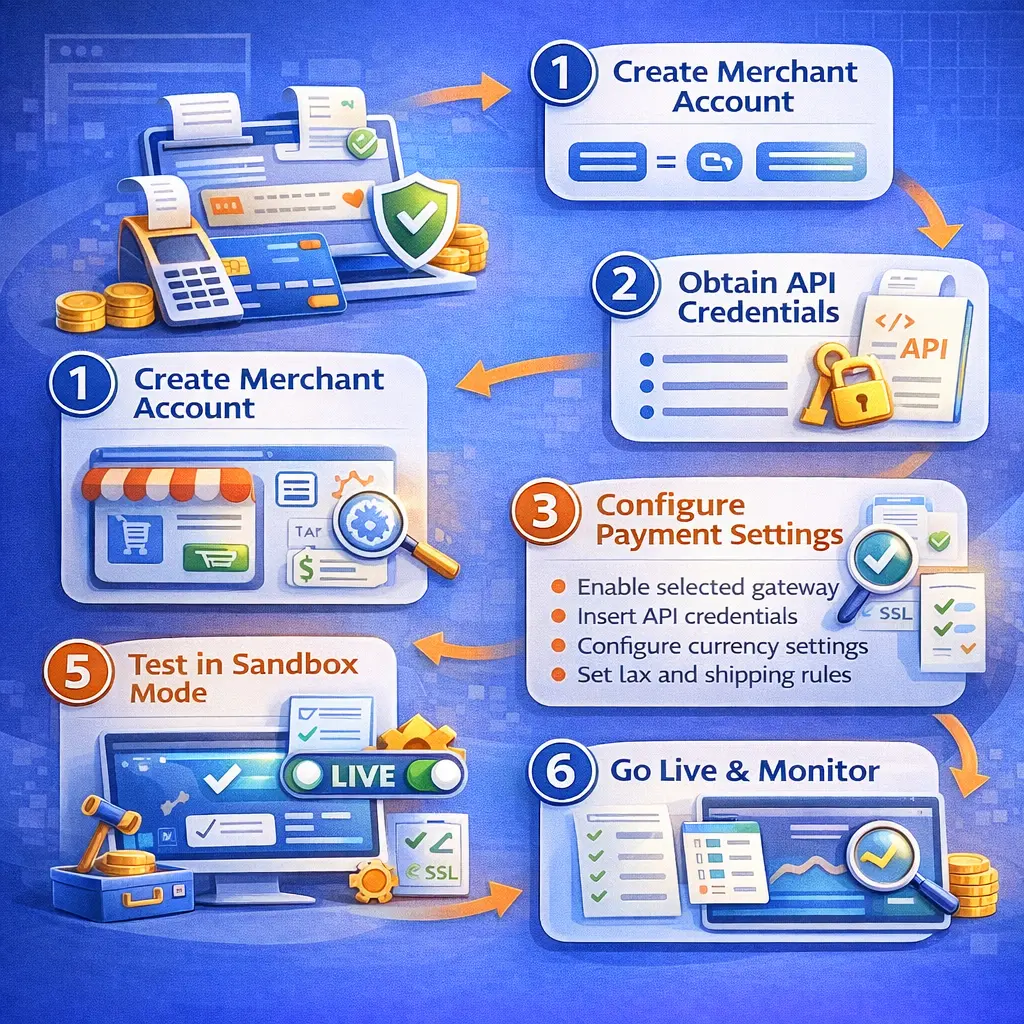
Step-by-Step Payment Gateway Integration Process
Now let’s walk through full implementation.
Step 1: Create a Merchant Account
Some gateways bundle merchant accounts (like Stripe).
Others require a separate merchant provider.
You must verify your business identity and bank details.
Step 2: Obtain API Credentials
After approval, the gateway provides:
- API keys
- Secret keys
- Webhook endpoints
- Sandbox access
You use these credentials to connect your ecommerce platform.
Step 3: Configure Payment Settings
Inside your ecommerce platform:
- Enable the selected gateway
- Insert API credentials
- Configure currency settings
- Set tax and shipping rules
- Activate fraud filters
Incorrect configuration causes failed transactions.
Step 4: Implement Secure Checkout
You must:
- Enable HTTPS with SSL certificate
- Ensure form encryption
- Avoid storing raw card data
- Display trust badges
Customers visually evaluate checkout security before completing payment.
Step 5: Test in Sandbox Mode
Never launch without testing.
Test:
- Successful transactions
- Declined payments
- Expired cards
- Refund process
- Webhook notifications
- Order status updates
Testing prevents live checkout failures.
Step 6: Go Live and Monitor
After testing, switch to live mode.
Monitor:
- Transaction success rate
- Payment failures
- Fraud attempts
- Settlement reports
Integration does not end at launch.
You must monitor continuously.
Payment Gateway Fees Explained
Understanding cost structure protects margins.
Here’s a simplified breakdown:
Fee Type | Description |
Transaction Fee | Percentage per sale (e.g., 2.9% + $0.30) |
Monthly Fee | Recurring platform fee |
Chargeback Fee | Fee when customer disputes payment |
International Fee | Extra cost for foreign cards |
Refund Fee | Fee applied when refunding payments |
Small businesses often ignore fee structure until profit margins shrink.
Choose wisely.
Optimizing Payment Gateway Performance
Speed affects checkout completion.
Optimize by:
- Reducing unnecessary checkout fields
- Enabling one-click payments
- Supporting digital wallets (Apple Pay, Google Pay)
- Implementing autofill support
- Optimizing mobile checkout design
A fast checkout increases conversion rate immediately.
Common Payment Gateway Integration Mistakes
Many businesses make preventable errors.
Avoid:
- Launching without sandbox testing
- Ignoring PCI compliance
- Using outdated API versions
- Not configuring webhooks properly
- Failing to optimize mobile checkout
- Ignoring fraud monitoring
Most failed checkouts happen because of configuration errors — not gateway failures.
Case Study: Small Business Ecommerce Payment Optimization
A small US-based apparel store struggled with a 58% cart abandonment rate.
The problem was not traffic.
It was checkout friction.
Issues identified:
- Slow redirect-based gateway
- Limited payment options
- Mobile layout misalignment
- No express checkout
We restructured the integration using embedded API-based checkout, added Apple Pay and Google Pay, optimized mobile layout, and reduced checkout steps from five to three.
Results within 60 days:
- Cart abandonment reduced to 41%
- Conversion rate increased by 22%
- Mobile checkout completion improved significantly
- Fewer support tickets related to failed payments
The difference was not marketing.
It was payment infrastructure.
When You Should Upgrade Your Payment Integration
You should consider upgrading if:
- You experience frequent payment failures
- Customers complain about checkout
- You expand internationally
- You scale beyond basic platform capabilities
- You need subscription billing
- You require advanced fraud protection
Scaling businesses need scalable payment architecture.
Final Thoughts
Payment gateway integration is not just a technical step.
It is revenue infrastructure.
If your checkout feels slow, insecure, or complicated, customers leave.
If it feels fast, secure, and seamless, customers buy.
For small businesses building serious ecommerce presence in the USA, integrating payment systems properly from the beginning prevents expensive rework later.
When implemented correctly, your payment gateway becomes invisible.
Invisible systems convert best.
Frequently Asked Questions
What is payment gateway integration?
It is the process of connecting your ecommerce website to a secure system that processes customer payments.
How long does payment gateway integration take?
Basic integration can take a few hours. Custom API integrations may take several days depending on complexity.
Do I need PCI compliance?
Yes. If you accept credit card payments, you must comply with PCI standards.
What is the best payment gateway for small businesses?
The best option depends on transaction volume, business model, and required features.
Can I integrate multiple payment gateways?
Yes. Many ecommerce stores integrate multiple gateways to increase payment flexibility and reduce failure risk.