

Quick Answer:
Key Point | Summary |
SEO Impact | Google ranks using mobile-first indexing — a poor responsive layout directly hurts rankings |
Core Web Vitals Affected | LCP, INP, and CLS all degrade with bad breakpoints or oversized mobile assets |
Best Practice | Single responsive codebase over adaptive design or separate mobile sites |
2026 Factor | AI Overviews extract content only if it’s visible in HTML, not hidden behind JS toggles |
Quick Fix | Run Google’s Mobile-Friendly Test + PageSpeed Insights to catch issues fast |
Responsive web design directly impacts SEO because Google ranks your site based on its mobile version. Poor breakpoints, hidden content, and slow mobile load times hurt Core Web Vitals and rankings. This guide covers 2026 best practices, common mistakes, and a full mobile audit checklist.
If your website looks perfect on a desktop monitor but breaks down on a phone, you’re not just losing visitors – you’re losing rankings. Google has indexed the mobile version of your site as the primary version for years now, which means every layout shift, hidden menu, and slow-loading image on mobile directly affects how you rank.
Responsive web design isn’t a design trend anymore. It’s a technical SEO requirement that determines whether search engines can crawl, understand, and rank your content properly across every device your visitors use.
This guide breaks down exactly how responsive design impacts your search visibility in 2026, what’s changed with mobile-first indexing and AI-driven search results, and the specific fixes that move the needle on rankings – not just aesthetics.
What Is Responsive Web Design (and Why It’s an SEO Ranking Factor in 2026)

Responsive web design means your website uses a single codebase that automatically adjusts its layout, images, and content based on the visitor’s screen size. Instead of maintaining separate desktop and mobile versions, one set of files handles every device – from a small phone screen to a widescreen monitor.
This matters for SEO because of one core reason: Google doesn’t rank your website twice. It evaluates one version of your site, and since 2018, that version has been the mobile one. If your mobile experience is broken, slow, or missing content that exists on desktop, your rankings suffer regardless of how polished your desktop site looks.
How Google’s Mobile-First Indexing Treats Responsive vs. Adaptive Sites
Mobile-first indexing means Googlebot primarily crawls and indexes the mobile version of your pages to determine rankings for both mobile and desktop searches. A responsive site makes this straightforward because the content, structure, and metadata are identical across devices – there’s nothing to reconcile.Adaptive design (where a server detects the device and serves a different template) can still work, but it introduces risk. If your mobile template accidentally omits content, links, or structured data that exists on desktop, Google’s mobile-first crawler simply won’t see it – and that content effectively doesn’t exist for ranking purposes.
Responsive design ensures Googlebot can crawl and index your content effortlessly, but that’s just the baseline for real traffic growth. Once you’ve secured your technical foundation, the next step is scaling your reach without burning your budget. Check out our Zero-Budget SEO 2026 guide to see exactly how you can outpace competitors and stand out in AI-flooded search results-all without spending a single dollar.
Responsive Design vs. Adaptive Design vs. Separate Mobile Site

Business owners often inherit one of three setups without realizing the SEO tradeoffs involved. Here’s how they compare:
Approach | How It Works | SEO Risk Level | Maintenance |
Responsive Design | One URL, one codebase, layout adjusts via CSS | Low – content stays consistent | Single site to update |
Adaptive Design | Server detects device, serves different templates | Medium – content can drift between versions | Multiple templates to maintain |
Separate Mobile Site (m.site.com) | Entirely separate site for mobile visitors | High – duplicate content, redirect chains, split authority | Two full sites to manage |
For almost every small business and startup website, responsive design is the only setup that avoids unnecessary SEO risk. It consolidates ranking signals into a single URL structure instead of splitting authority across duplicate versions.
The Direct Link Between Responsive Design and Core Web Vitals
Responsive design and Core Web Vitals are tightly connected because layout instability, image scaling, and interaction delays almost always show up first on mobile. A site that scores well on desktop can still fail its mobile Core Web Vitals if breakpoints weren’t built with performance in mind.
LCP, INP, and CLS – What Breaks on Responsive Layouts
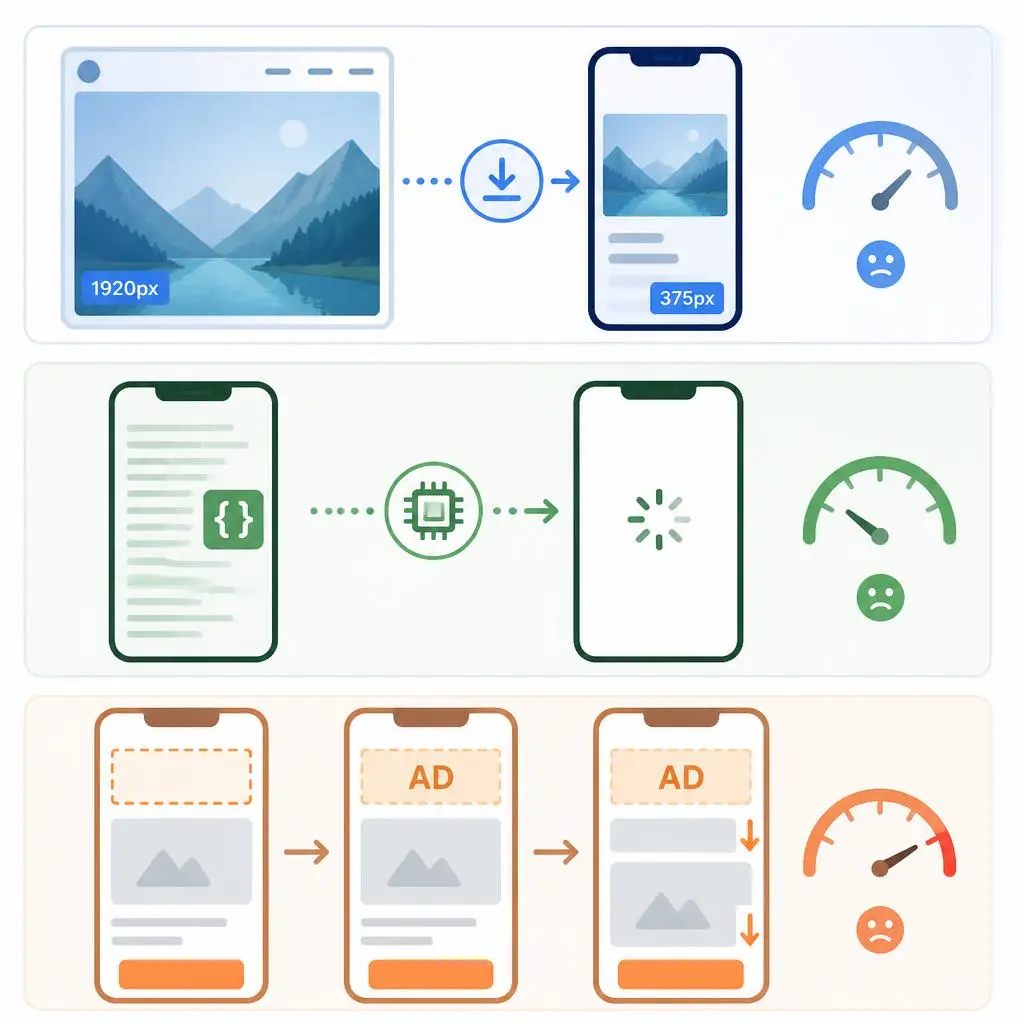
Largest Contentful Paint (LCP) suffers when hero images aren’t served at the correct size for smaller viewports, forcing mobile browsers to download and shrink oversized files. Interaction to Next Paint (INP) degrades when heavy JavaScript – common in responsive frameworks with device-detection scripts – blocks the main thread longer on lower-powered mobile CPUs. Cumulative Layout Shift (CLS) spikes when responsive grids reflow elements after fonts or ads load, pushing content around right as a user tries to tap something.
How Breakpoint Strategy Affects Real User Experience Scores
Breakpoints that are copied from a template rather than built around your actual content tend to create awkward in-between states – text that’s too small to read comfortably, buttons that sit too close together, or images that crop important details. These aren’t just UX annoyances; they show up as measurable friction in Google’s field data, which feeds directly into ranking signals.
If your Core Web Vitals scores are inconsistent between desktop and mobile, it’s usually a sign that your responsive breakpoints need dedicated technical attention rather than a quick CSS patch. Our Website Speed Optimization Services are built specifically to diagnose and fix these mobile-specific performance gaps.
2026 Technical Insights – What Changed This Year

Search hasn’t stood still, and responsive design now has to account for how content gets surfaced beyond the traditional blue-link results.
AI Overviews and Responsive Content Extraction
AI Overviews and other generative search features pull content directly from your page to build summaries, and they favor content that’s cleanly structured and fully visible in the HTML – not content hidden behind mobile-only JavaScript toggles. If your mobile layout collapses key information into a “read more” click that requires user interaction to load, that content may never get extracted for AI-generated answers, costing you visibility even if you rank well organically.
Viewport Meta and New Device Classes
Foldable phones, split-screen tablets, and AI-integrated browsers have expanded the range of viewport sizes real users bring to your site. A viewport meta tag that assumes only “phone” and “desktop” as categories will produce broken layouts on these newer form factors, which increasingly show up in Search Console’s mobile usability reports.
How Search Engines Evaluate JS-Rendered Responsive Frameworks
Modern responsive frameworks increasingly rely on JavaScript to determine layout at runtime rather than pure CSS media queries. Googlebot can render JavaScript, but rendering happens in a separate queue and can lag behind initial crawling – meaning a heavily JS-dependent responsive layout risks a delay between when a page is crawled and when its true mobile content is actually indexed. If you’re troubleshooting inconsistent indexing on a JS-heavy site, our guide on eliminating render-blocking resources covers the underlying technical causes in more detail.
Why Work With RyDesk on Your Responsive Design
Getting responsive design right for SEO isn’t just about making things look good on a phone – it requires understanding how Google’s mobile-first crawler evaluates your site, how Core Web Vitals are measured in real user conditions, and how AI Overviews extract content from your pages. Our team has spent years diagnosing exactly these issues for small business and startup websites, fixing the technical gap between “looks fine” and “actually ranks.” If you’d rather have this handled properly than DIY it through trial and error, our Affordable SEO Web Design Services are built around this exact problem – responsive layouts that are engineered for search visibility from day one, not retrofitted after launch.
conclusion
Responsive web design in 2026 isn’t optional – it’s the foundation Google uses to decide whether your site deserves to rank. From Core Web Vitals to AI Overview extraction, every technical decision you make about breakpoints, images, and mobile layout has a direct line to your search visibility.
If you’re not confident your site is handling this correctly, the smartest next step is a proper technical audit rather than guesswork. Visit our Home Page to see how we approach performance-first web design, explore our website Services for a full responsive and SEO overhaul, or Contact Us directly for a free diagnostic audit of your current site.
FAQs
1.Does responsive design actually improve SEO rankings?
Yes, indirectly but significantly. Google uses mobile-first indexing, so a poorly responsive site hurts Core Web Vitals, usability signals, and crawlability – all of which affect rankings.
2.Is responsive design better than a separate mobile site (m.site.com)?
Almost always, yes. Separate mobile sites create duplicate content risk, split link authority, and require double the maintenance compared to a single responsive codebase.
3.Can hidden mobile content (tabs, accordions) hurt my SEO?
Not automatically, but if that content is hidden via JavaScript that doesn’t render properly, or excluded from AI Overview extraction, you lose visibility even though the content technically exists on the page.
4.What Core Web Vitals matter most for mobile responsive design?
LCP (loading speed), INP (interaction responsiveness), and CLS (visual stability) are the three metrics most affected by poor responsive implementation, especially oversized images and layout reflow.
5.How do I check if my website is actually mobile-friendly?
Use Google’s Mobile-Friendly Test, review the Mobile Usability report in Search Console, and run PageSpeed Insights on your key pages to check real mobile performance data.
6.Does responsive design affect ecommerce SEO differently?
Yes. Ecommerce sites have more complex layouts – product grids, filters, checkout flows – so responsive mistakes tend to hurt both conversions and crawlability more severely than on simpler content sites.
7.Will AI Overviews affect how my responsive site needs to be built?
Yes. AI Overviews pull content directly from your HTML, so content that’s fully visible and well-structured on mobile has a better chance of being extracted into AI-generated answers.
8.How often should I audit my site’s responsiveness?
At minimum, after any major theme, plugin, or page builder update, and every 3-6 months as a standard maintenance check, since new device sizes and browser behaviors change over time.