

Quick Answer
Layer | What Gets Fixed | Typical Impact |
Hosting & TTFB | Server response, PHP version | Faster first byte |
Database & Plugins | Bloat, unused plugins | Faster backend queries |
Images | Compression, format, lazy load | 30-50% less page weight |
CSS/JS | Render-blocking scripts | Faster visual load (LCP) |
Caching & CDN | Server + browser + edge delivery | Faster repeat & global visits |
WordPress speed optimization in 2026 means fixing five layers – hosting response time, database bloat, image weight, render-blocking code, and caching – instead of relying on a single plugin. Done properly, most sites drop from 4-6 seconds down to under 2 seconds, pass Core Web Vitals, and see a real lift in conversions. It’s typically a one-time project scoped after a real audit, not a flat-rate subscription, and a good fix should never touch pages like cart or checkout that need to stay dynamic.
Most “slow WordPress site” problems aren’t one problem. They’re five smaller ones stacked on top of each other – a bloated database, an unoptimized hero image, a plugin loading scripts on pages that don’t need them. Fixing it means going layer by layer, not chasing a single PageSpeed number.
What Is WordPress Speed Optimization in 2026?

WordPress speed optimization is the process of identifying and fixing everything slowing a site down – on desktop and mobile – without breaking its design or functionality.
This isn’t the same as “installing a caching plugin and hoping.” A caching plugin treats one symptom. Real optimization looks at the full stack: hosting, database, images, code, and how your page builder renders content. Fix one layer and ignore the rest, and the site plateaus at a mediocre score instead of actually getting fast.
Why a Slow WordPress Site Costs You More Than You Think
The numbers aren’t abstract. A one-second delay in load time can measurably cut conversions, and more than half of mobile visitors abandon a page that takes over three seconds to load. For a store, that’s checkout abandonment. For a service business, that’s a visitor who leaves before your contact form even loads.
I’ve worked on sites where the owner assumed a traffic drop was a marketing problem, when the real issue was a homepage that had crept up to 6+ seconds after a year of adding plugins and high-res images without ever cleaning up. Once we brought it under 2 seconds, bounce rate dropped and time-on-site rose – no content changes needed.
Speed isn’t polish. It’s the difference between a visitor staying long enough to convert or leaving before they see what you offer.
The 5-Layer Framework Behind Every Real Speed Fix
Layer 1 – Hosting & Server Response (TTFB)
Before touching a plugin, we check Time to First Byte – how fast your server responds before the browser even starts rendering. No amount of caching fixes a server that’s slow to respond in the first place. This means checking PHP version, resource limits, and whether hosting can actually handle your traffic.
Layer 2 – Database & Plugin Cleanup
WordPress databases accumulate junk fast – post revisions, expired transients, orphaned data from deactivated plugins. On sites a few years old, we’ve seen tables bloated with tens of thousands of unnecessary rows, silently slowing every query. If your site has been getting slower without any obvious cause, this is usually why – our guide on why a website suddenly slows down walks through the diagnosis.
Layer 3 – Image & Media Optimization
Images are usually the single biggest chunk of page weight. This means converting to modern formats, compressing without visible quality loss, and lazy loading anything below the fold. Getting this right, alongside proper file naming, typically cuts total page weight by a third – covered in our image SEO and alt text guide.
Layer 4 – Render-Blocking CSS & JavaScript
Unminified CSS and scripts that block rendering are a common reason a site still feels slow after caching is set up. This layer means deferring non-critical scripts and clearing what’s forcing the browser to wait – our full walkthrough is in how to eliminate render-blocking resources.
Layer 5 – Caching & CDN
Caching should be the last layer, not the first fix. Once everything underneath is genuinely optimized, proper caching plus a CDN locks in the gains for repeat visitors and global traffic. If cache isn’t clearing properly after changes, that’s its own separate issue – see our WordPress cache clearing guide.
WooCommerce Speed Optimization: What Changes

WooCommerce stores carry extra weight most sites don’t – product images, variation data, cart and session handling. A generic caching setup can break a store if it caches cart or checkout pages that need to stay dynamic per visitor. The safe approach excludes those pages from full-page caching while still optimizing catalog images and queries – detailed in our WooCommerce speed optimization guide.
Elementor & Page Builder Speed Problems
Elementor is convenient but loads extra CSS and JavaScript for every module, even unused ones. A frequent related issue is stylesheets not updating properly after edits, which quietly bloats page weight over time – our Elementor CSS troubleshooting guide covers the fix directly.
Why WordPress Sites Fail Core Web Vitals on Mobile
Mobile connections are far more sensitive to unoptimized images and blocking scripts than desktop wifi. A site that “feels fine” in the office can still fail Core Web Vitals on a real mobile connection – the gap and the fix are broken down in our mobile vs desktop speed guide.
Speed Plugin vs Hiring a WordPress Speed Expert
Caching Plugin Alone | Speed Expert (Full Audit) | |
Fixes server response | No | Yes |
Fixes database bloat | No | Yes |
Optimizes images properly | Rarely | Yes |
Fixes render-blocking code | Partially | Yes |
Risk of breaking checkout/cart | Higher if misconfigured | Low, tested per page |
Long-term result | Plateaus quickly | Holds over time |
A caching plugin is one layer of a five-layer job. That’s why so many sites still score poorly on PageSpeed even with one active.
When a “Speed Fix” Actually Breaks the Site
The most common failure isn’t a bad plugin – it’s a plugin update going wrong mid-fix, or caching applied somewhere it shouldn’t be. If a site broke right after a plugin update, that’s a specific and fixable problem, not a sign the whole site needs rebuilding – see our guide on WordPress breaking after a plugin update.
How Much Does WordPress Speed Optimization Cost in 2026?
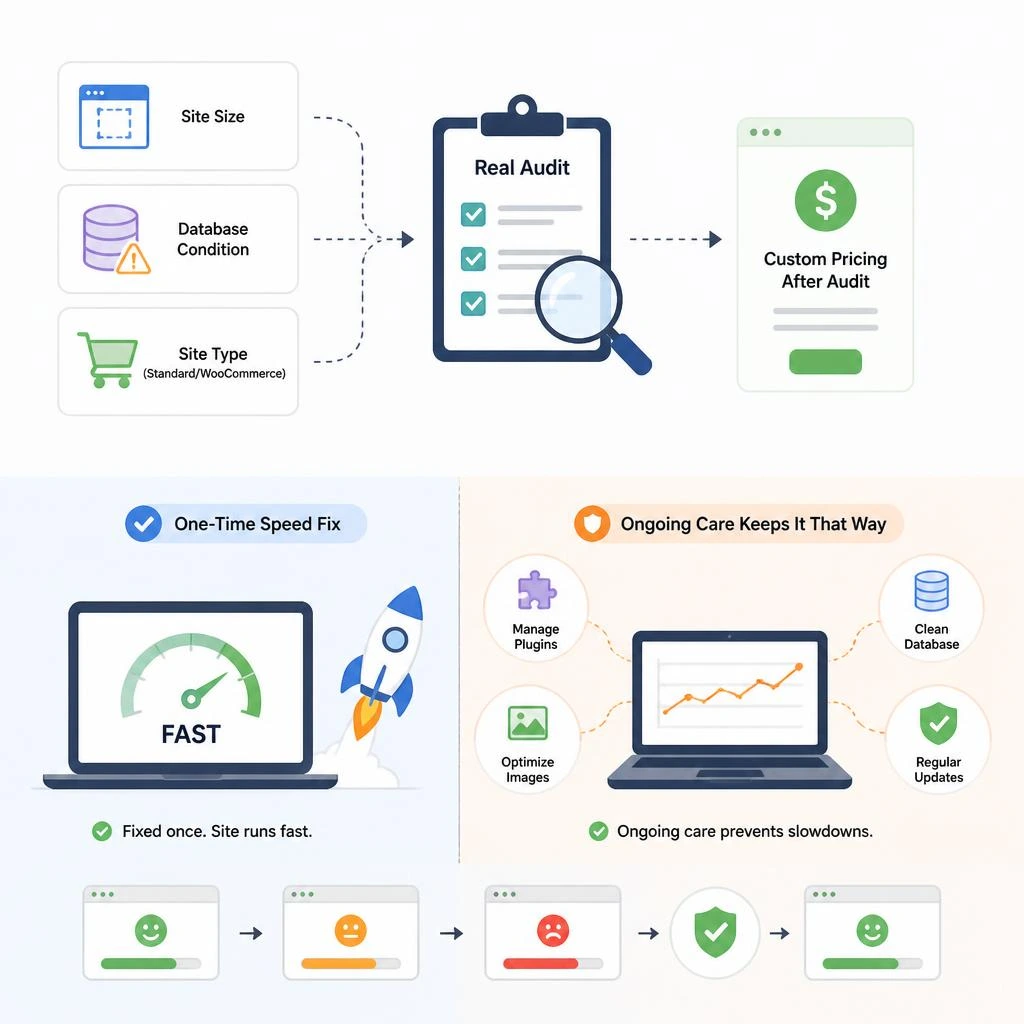
Pricing depends on site size, database condition, and whether it’s a standard site or a WooCommerce store. Rather than a flat number sold before anyone’s looked at the site, cost should follow a real audit. For a broader view of what maintenance-related pricing looks like across providers in 2026, see our WordPress maintenance cost guide.
Is Speed a One-Time Fix or Ongoing Maintenance?
Speed optimization itself is typically a one-time project – once fixed, a well-built site stays fast. But it can quietly degrade again as plugins pile up or images get added without compression. Pairing the fix with ongoing care keeps that from happening – our WordPress maintenance for small business guide covers what that looks like long term.
Conclusion
A slow WordPress site in 2026 is almost never one broken thing – it’s several smaller problems compounding until the whole site feels sluggish. The honest fix isn’t a single caching plugin; it’s working through hosting, database, images, code, and caching as one connected process, in that order. Skip a layer and the results plateau. Do it properly and the gains hold.
If you’re not sure how slow your site actually is or where the real bottleneck lives, that’s worth a real audit rather than a guess – visit rydesk.com to see how we approach it, explore our Website Speed Optimization Services, or contact us and we’ll show you exactly what’s slowing your site down.
FAQs
- How much does WordPress speed optimization cost in 2026?
It depends on site size and database condition – a small site costs less than a full WooCommerce optimization. A real quote should follow an audit, not come before one. - How long does WordPress speed optimization take?
Most sites take three to five business days. Larger stores with more plugins and customization can take up to a week. - Will speed optimization break my site’s design or checkout flow?
Not when done properly. Every fix should be tested on real pages afterward, and anything that shouldn’t be cached – like cart or checkout – should stay untouched. - Is WordPress speed optimization a one-time fix or ongoing work?
Typically one-time. The site stays fast afterward, though ongoing maintenance helps prevent speed from slipping again as content and plugins get added. - Does speed optimization actually help my Google rankings?
Yes, indirectly. Core Web Vitals are a confirmed ranking signal, so passing them removes a real handicap – though speed alone won’t rank a site without solid content and technical SEO alongside it. - Can WordPress be sped up without adding more plugins?
Often, yes. Better hosting, database cleanup, and properly sized images account for a lot of the gain – sometimes removing plugins helps more than adding one. - What’s the difference between a caching plugin and hiring a speed expert?
A caching plugin stores page copies for faster reloads – one layer. A speed expert fixes everything underneath: server response, database, images, and code, not just the surface symptom. - Why does my WordPress site load fine on desktop but slow on mobile?
Mobile connections are more sensitive to unoptimized images and blocking scripts than desktop wifi. A site that feels fast on office internet can still fail Core Web Vitals on a real mobile network.