

Quick Summary
Focus Area | Key Action |
Alt Text | Describe the image specifically – skip “image of” and never stuff keywords |
File Names | Rename every file with a hyphenated, descriptive slug before uploading |
Format & Speed | Convert images to WebP and compress under 100KB before publishing |
Discovery | Submit an image sitemap and add Schema markup for richer search results |
Most websites treat alt text like an afterthought – type a few words, move on, hope Google figures out the rest. That’s exactly why so many product photos, blog images, and infographics never show up in Google Images at all. Fix alt text and file names properly, and you unlock a second search channel running quietly inside Google.
This guide covers exactly how to write alt text that ranks, name image files the way Google actually reads them, and avoid the technical mistakes that quietly cap your image traffic – including WordPress and Elementor specifics most generic guides skip entirely.
Why Image SEO Still Matters in 2026

Google’s computer vision has gotten significantly better at recognizing what’s inside an image, but text signals – alt text, file names, surrounding content – still do the heavy lifting for indexing and ranking. Vision models help Google confirm what an image shows; they don’t replace the text that tells Google why it matters for a given query.
The bigger shift in 2026 is where image results actually show up. Beyond the standard Image Search tab, optimized images now feed Google’s AI Overviews and visual search through Google Lens. A product photo with weak alt text doesn’t just lose Image Search traffic anymore – it gets skipped entirely when Google assembles an AI-generated answer that could have featured it.
Optimizing your website’s graphics is a smart move, but it’s just one piece of a much bigger puzzle. To really see those rankings shoot up, your entire site needs to be built with search engines in mind from day one, which is why smart business owners look for Affordable SEO Web Design Services to handle the heavy lifting. When you combine perfectly optimized images with a clean, fast-loading, and responsive design, you create a powerful website that Google loves to rank and users love to browse.
For a business running on WordPress, this is rarely a one-time fix. It’s a workflow problem, which is exactly where most sites fall apart – not from lack of knowledge, but from no repeatable process. If your site’s overall SEO foundation still needs work, a proper SEO-friendly site structure makes every image optimization you do afterward worth more.
What Alt Text Actually Does for Your Rankings
Alt text is the HTML attribute attached to an image tag that describes what the image shows. It does three jobs at once: tells crawlers what’s in the image, displays as a fallback if the image fails to load, and gets read aloud by screen readers for accessibility.
How Google Reads Alt Text During a Crawl

When Googlebot processes a page, it can’t “see” an image the way a person does – it reads the alt attribute as the primary description of that visual content. If the alt text matches real search intent, the image becomes eligible to surface in Image Search and can reinforce the topical relevance of the whole page.
A real example: a WooCommerce product page selling a navy canvas tote bag, with alt text reading “navy canvas tote bag with leather handles,” gives Google a far stronger relevance signal than “tote-bag-final2.” That specificity is what separates a product image ranking for “canvas tote bag” versus sitting unindexed in Image Search.
Alt Text vs. Image Title vs. Caption
These three get confused constantly, and mixing them up wastes optimization effort on the wrong attribute.
Attribute | Visible to Users? | SEO Impact | Purpose |
Alt Text | No (unless image fails) | High | Describes image for crawlers and screen readers |
Image Title | Yes, on hover | Low | Tooltip text, minor supplementary signal |
Caption | Yes, displayed below image | Low-Medium | Context for human readers, can include keywords naturally |
Only alt text directly affects how Google indexes the image. Title and caption support the page’s overall content quality but won’t move an image’s ranking on their own.
Writing Alt Text That Actually Ranks
Be Specific, Not Generic
“Shoe” tells Google nothing useful. “Men’s black leather oxford dress shoe” tells Google exactly what’s in the frame and gives you a shot at long-tail visual queries that generic alt text can never reach.
Skip the Keyword Stuffing
If a keyword fits naturally, include it once. Forcing it repeatedly is a guideline violation, not an optimization tactic.
Good: alt=”WordPress plugin update screen showing pending updates”
Bad: alt=”WordPress plugin WordPress update WordPress tutorial WordPress”
Character Length: What’s Real vs. What’s Myth
A lot of guides quote “125 characters” as if it’s a Google ranking rule. It isn’t. That number comes from where some screen readers used to truncate text – it has nothing to do with how Google’s algorithm weighs the description. Write a clear, complete description first. If it naturally lands under roughly 125 characters, good. If it runs slightly longer to stay accurate, that’s fine too. Don’t sacrifice clarity to hit an arbitrary number.
Leave Decorative Images Empty
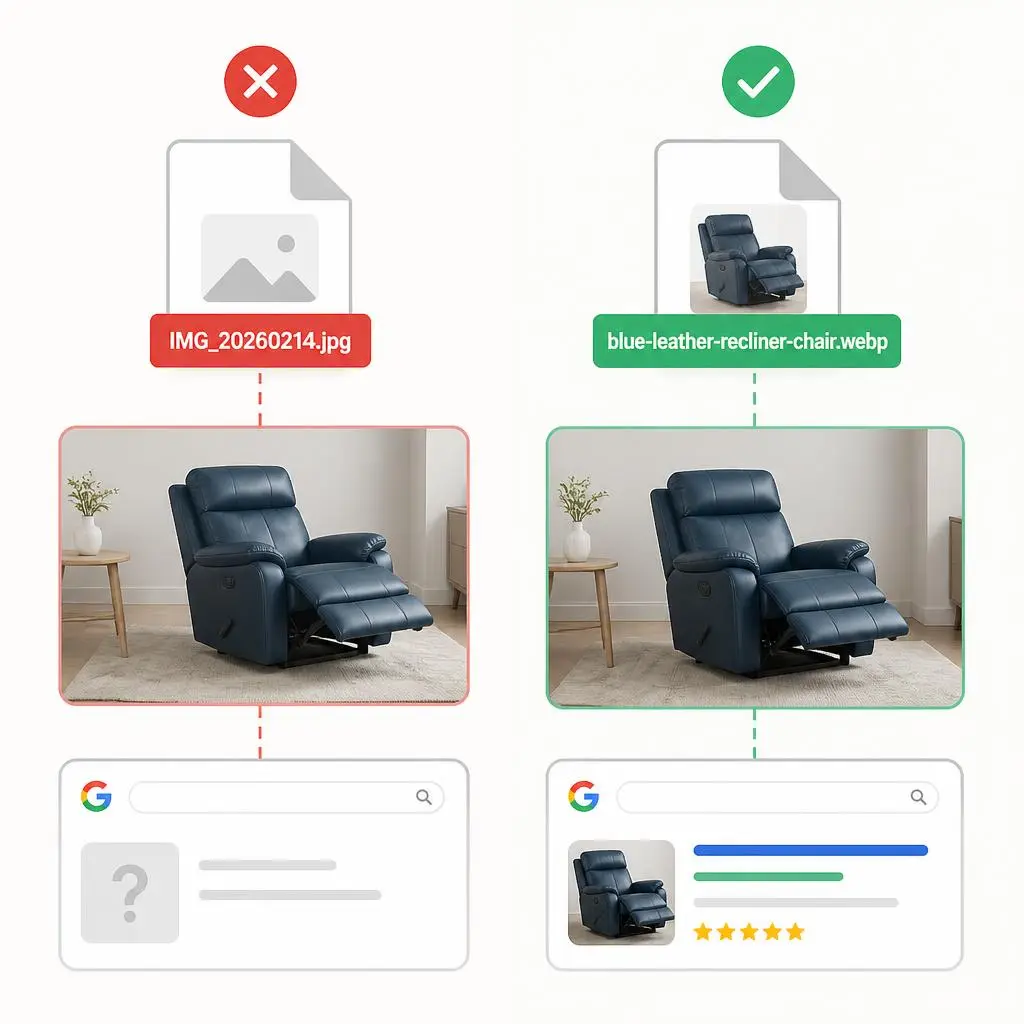
Dividers, background textures, and purely visual icons with zero informational value should get alt=””. This explicitly tells screen readers and crawlers to skip the image, which keeps your relevance signals clean instead of diluted by noise.
Dividers, background textures, and purely visual icons with zero informational value should get alt=””. This explicitly tells screen readers and crawlers to skip the image, which keeps your relevance signals clean instead of diluted by noise. If you are customizing visual elements like icons or menus, learning how to change the link color in WordPress properly will ensure your styling remains clean without messing up your page code.
Image File Names:The Signal Most Sites Get Wrong Before Upload Even Happens
By the time an image lands on your page, its file name has already told Google something – good or bad. A file named IMG_20260214.jpg communicates nothing. A file named blue-leather-recliner-chair.webp communicates exactly what’s in it, before Google even processes the pixels.
The Renaming Workflow
Rename every image before it touches your CMS. Waiting until after upload means re-uploading, which breaks any links already pointing to that file.
Rules that actually matter:
- Lowercase letters only
- Hyphens between words, never underscores or spaces
- One or two relevant keywords, not a keyword list
- Five to six words maximum for clarity
- The name must match what’s actually in the image
File Name Examples Across Industries
Industry | Poor File Name | Optimized File Name |
WooCommerce Store | product-final-v2.jpg | mens-navy-canvas-tote-bag.webp |
Real Estate | listing0034.png | 3-bedroom-house-exterior-austin.webp |
Restaurant | IMG_8821.jpg | grilled-salmon-dinner-special.webp |
SaaS / Software | screenshot-new.png | crm-dashboard-analytics-view.webp |
Photography Portfolio | shoot2_edit.jpg | golden-hour-wedding-portrait-session.webp |
WordPress and Elementor: Where Most Image SEO Actually Breaks
This is the part generic guides skip, and it’s where most of the damage actually happens on real client sites.
Plugins That Handle Alt Text and Compression
Yoast SEO and Rank Math both flag missing alt text site-wide, but neither one writes it for you – that’s still manual work, and skipping it is the single most common gap found during site audits. For compression, ShortPixel and Smush both auto-convert to WebP on upload, but their default compression settings are often too conservative; check the settings and push them toward “glossy” or “high” compression rather than leaving defaults, since most clients never touch this after plugin install.
Elementor Image Widget Settings That Affect SEO

Elementor’s Image widget pulls alt text directly from the WordPress Media Library by default – but if a client uploaded that image months ago without setting alt text, the widget will silently render with empty alt, even if the surrounding page content is fully optimized. Always check the Media Library entry directly, not just the widget settings panel, before assuming an image is covered. If you notice structural layout shifts or missing sections while working with these widgets, you can follow this step-by-step guide on how to fix an Elementor layout broken after update error instantly.
The WordPress Mistake That Undoes Everything Else
WordPress auto-generates a “title” from the filename on upload if nothing else is set – and many site owners mistake this auto-generated title for proper alt text, leaving the actual alt field blank. A quick way to catch this is to filter the Media Library by upload date and spot-check anything older than six months, since this is almost always where the gaps live. Neglecting these database sync issues and outdated files can pile up over time, occasionally leading to severe system crashes like the dreaded how to fix WordPress critical error bug.
Technical Image Optimization Beyond Alt Text
Choosing the Right File Format
Format | Best For | Why |
WebP | Most web images | Smaller file size, comparable quality to JPEG |
AVIF | High-traffic hero images | Even smaller than WebP, growing browser support |
JPEG | Complex photographs | Wide compatibility, acceptable compression |
PNG | Images needing transparency | Lossless, larger file size |
SVG | Logos and icons | Scalable, tiny file size, crisp at any resolution |
Compression Targets
Aim for under 100KB on most content images, and under 200KB for full-width hero images. Tools like ShortPixel, TinyPNG, and Squoosh handle this without visibly degrading quality. If your site is already feeling sluggish, this is one of the fastest wins available – a website speed optimization checklist covers the rest of the page-speed picture beyond just images.
Lazy Loading and Core Web Vitals
Lazy loading defers off-screen images until a user scrolls near them. It directly helps Largest Contentful Paint and Total Blocking Time – but apply it carefully. Lazy-loading your hero image (the one visible without scrolling) actually hurts LCP, since it delays the very element Google measures for that score. Lazy-load everything below the fold, never the hero image itself.
Responsive Images with srcset

A single 4000px-wide image served to a mobile visitor on a 375px screen wastes bandwidth and slows load time for no visual benefit. The srcset attribute lets the browser pick the right image size for the device automatically. Most modern WordPress themes generate these automatically, but custom-coded sites and some Elementor templates skip it – worth checking directly in your page source if mobile speed feels off, since mobile load times running slower than desktop is frequently a missing-srcset problem disguised as something else.
Structured Data and Image Sitemaps for Faster Indexing
Image Sitemaps
A standard XML sitemap tells Google your pages exist. An image sitemap specifically flags which images on those pages should be crawled, which speeds up discovery – particularly valuable for image-heavy sites like ecommerce catalogs or photography portfolios. Most WordPress SEO plugins generate this automatically, but it’s worth confirming it’s actually submitted in Google Search Console rather than assuming it.
Schema Markup for Images
For product pages, Schema.org Product markup with an image property helps your product photo appear in shopping carousels and image packs. For blog content, Article schema with an associated image can unlock enhanced previews in Google Discover, which tend to pull noticeably higher click-through rates than plain text listings.
Image SEO for AI Overviews and Visual Search
Google’s AI Overviews increasingly pull images directly into generated answers, not just the standard Image tab. The selection criteria favors images with strong, specific alt text and clean surrounding context over images that are merely high-resolution. A beautifully shot product photo with vague alt text gets passed over for a mediocre photo with a precise, accurate description – context wins over polish here.
Google Lens-based visual search works similarly: it matches visual features against indexed images, but the text layer around that image (alt text, page content, file name) still determines which page gets the click when multiple visually similar images exist.
Common Image SEO Mistakes That Quietly Hurt Rankings
Mistake | Why It Hurts | Fix |
Duplicate alt text across images | Looks spammy, dilutes relevance | Write unique, specific text per image |
Ignoring blog post images | Most images on a site sit in blog content, not products | Audit every image, not just hero/product shots |
Embedding text inside images | Google can’t read text baked into a JPEG/PNG | Use real HTML text for headings and CTAs |
Skipping the image title attribute | Minor signal lost, no major harm | Add where relevant, don’t obsess over it |
Never checking Search Console’s Image filter | No visibility into what’s actually working | Review monthly under Performance > Search Type |
A Repeatable Image SEO Workflow
- Source or create the image
- Rename the file with a descriptive, hyphenated slug
- Compress to WebP, targeting under 100KB
- Upload to the Media Library and immediately set alt text
- Add a title attribute where it adds context
- Confirm the image sitemap includes it (check Search Console)
- Apply lazy loading below the fold only, never on the hero image
- Spot-check monthly using the Search Console Image filter
Skip a step once, and it compounds – six months later you’re auditing 200 images instead of checking one. Sites under ongoing care rarely hit this problem, since regular WordPress maintenance usually includes catching exactly this kind of drift before it piles up.
Conclusion
Image SEO isn’t a one-time checklist – it’s a habit that compounds or decays depending on whether anyone’s watching it. Alt text and file names are the two cheapest, highest-leverage levers you control directly, and getting them right on every new upload costs almost nothing compared to going back and fixing 300 images later.
If you’re not sure where your own site currently stands, that’s exactly the kind of gap we look for first. Visit RyDeskto see how we approach WordPress projects, check our WebsiteMaintenance Services for a deeper technical audit that includes image performance, or ContactUs to talk through what’s actually happening on your site right now.
FAQs
1.Does Google still use alt text for image ranking in 2026?
Yes. Google still reads alt text as a primary signal for understanding and indexing images. While AI image recognition has improved, alt text remains the clearest, most reliable way to tell Google what an image actually shows.
2.What’s the difference between alt text, image title, and caption?
Alt text describes an image for crawlers and screen readers. Image title is a hover tooltip with minor SEO weight. Caption is visible text below an image. Only alt text directly affects how Google indexes the image itself.
3.How long should alt text be?
There’s no official Google character limit. The 125-character guideline comes from screen reader behavior, not a ranking rule. Write a clear, specific description first, then trim only if it reads unnaturally long.
4.Should I add alt text to decorative images?
No. Purely decorative images like dividers, icons, or background textures should have an empty alt attribute (alt=””). Adding text to non-informational images can confuse screen readers and dilute relevance signals on the page.
5.What’s the best image format for SEO, WebP or JPEG?
WebP wins for most web images in 2026 because it delivers smaller file sizes at similar quality. Use JPEG for complex photographs needing wider compatibility, and SVG for logos, icons, and simple vector graphics.
6.Do I need a separate image sitemap if I already have an XML sitemap?
Yes. A standard XML sitemap tells Google your pages exist; an image sitemap specifically flags which images on those pages should be crawled and indexed, which speeds up discovery, especially on image-heavy sites.
7.Can my images show up in Google’s AI Overviews?
Yes. Google’s AI Overviews can surface images alongside summarized answers when the image has strong contextual signals, including descriptive alt text, surrounding content relevance, and clean file naming.
8.How often should I audit my website’s image SEO?
Audit image SEO every time you publish new content, and run a full site-wide check quarterly. Use Google Search Console’s Image filter under Performance to spot underperforming or unindexed images.