


Quick Summary
| Section | What You’ll Learn |
| Technical Foundation | How INP, FCP, and Elementor CSS bloat affect rankings |
| Semantic Architecture | Why <div>-soup kills crawlability and AI comprehension |
| Silo Structures | How to build topical authority during the design phase, not after |
| AI Visibility (GEO) | How to format content for AI Overviews and LLM citation |
| Blueprint | A 6-step build sequence + copy-paste implementation checklist |
| Schema | A unified nested @graph model connecting WebPage, BlogPosting, and BreadcrumbList |
Most “web design with SEO” guides are written by people who’ve never opened a Core Web Vitals report or debugged a CSS specificity conflict in Elementor. They tell you to “make your site fast” and “use clear navigation” – advice that was already generic in 2020.
This guide is different. We’re going to walk through the actual technical mechanics of building a website that’s structurally optimized for search engines and AI search systems from the wireframe stage forward – not bolted on after launch with a plugin.
If you’re a designer, a developer, or a small business owner trying to understand why your beautifully designed site isn’t ranking, this is the build process behind every project we take on as part of our affordable SEO web design services – and it’s the same framework you can apply whether you’re building in-house or hiring it out.
What Is “Web Design with SEO” and Why It’s Different in 2026
The Old Model – Design First, SEO Later (Why It Fails)
The traditional workflow looks like this: design the site, build it, launch it, then hand it to an SEO team to “optimize” afterward. This model treats SEO as a layer you apply on top of a finished product – like painting a house after the foundation has already cracked.
The problem is that most ranking-relevant factors are baked into decisions made during design and development, not after:
- Page speed and INP are determined by how many scripts, animations, and third-party widgets get added during build.
- Crawlability is determined by the HTML structure the theme or builder generates.
- Topical authority is determined by the site architecture – which pages exist, how they’re grouped, and how they interlink.
By the time SEO gets involved post-launch, you’re not optimizing – you’re doing damage control.
The 2026 Model – SEO-Integrated Design from Wireframe to Launch
In 2026, SEO-integrated design means every major decision – page builder choice, navigation structure, image handling, heading hierarchy – is made with search and AI-search visibility in mind from day one.
This isn’t about sacrificing design quality for SEO. It’s about understanding that the two are no longer separable disciplines. A site that loads slowly because of bloated animations isn’t “well-designed” – it’s a site that fails its primary job, which is to be found and used.
The Technical Performance Layer – Speed, INP, and Core Web Vitals

Core Web Vitals in 2026: What Actually Changed
If your understanding of Core Web Vitals still centers on FID (First Input Delay), you’re working from an outdated model. Google officially replaced FID with INP as a Core Web Vital in March 2024, and by 2026, INP performance is a baseline ranking and UX expectation – not a “nice to have.”
Why FID Is Dead – Understanding INP (Interaction to Next Paint)
FID only measured the delay before a browser started processing the first user interaction. It ignored everything that happened after – including long-running JavaScript that froze the page mid-interaction.
INP measures the full interaction lifecycle: from the moment a user clicks, taps, or types, to the moment the browser visually responds. It captures the worst interaction on the page, not just the first one. This matters enormously for design-heavy sites because:
- A slow-loading mega menu
- A laggy form field
- A sluggish “Add to Cart” button
- A janky accordion or tab interaction
…all directly tank your INP score, even if your initial page load looks fast.
INP thresholds (2026 standard):
| Rating | INP Score |
| Good | Under 200ms |
| Needs Improvement | 200ms–500ms |
| Poor | Over 500ms |
FCP (First Contentful Paint) and Its Design-Level Causes
FCP measures how quickly the first piece of content renders. It’s directly affected by:
- Render-blocking CSS and JavaScript loaded in the <head>
- Large hero images or video backgrounds with no compression
- Web fonts loaded without font-display: swap
- Server response time (TTFB) before the browser even starts rendering
A common design-stage mistake: full-width hero sections with autoplay video backgrounds. They look stunning. They also frequently push FCP past the 1.8-second “good” threshold because the browser is forced to download and decode large media files before painting anything meaningful.
If you’re seeing inconsistent load times across pages – or worse, a page that occasionally fails to load at all – that’s often a symptom of deeper backend issues rather than just front-end bloat. Memory exhaustion from heavy plugins or theme conflicts during asset loading is a frequent culprit, and it’s worth ruling out using our guide on fixing critical WordPress errors before assuming the slowdown is purely a design problem.
Design Decisions That Silently Kill INP
Heavy Sliders, Carousels, and Animation Libraries
Sliders are one of the worst offenders for INP. Most slider plugins/widgets run continuous JavaScript timers and re-paint the DOM repeatedly, competing with user interactions for main-thread time. If a visitor taps a button while a slider is mid-transition, that interaction queues behind the slider’s JavaScript – and your INP score pays for it.
Fix approach:
- Replace JS-heavy sliders with CSS-only carousels where possible
- Limit autoplay sliders to above-the-fold hero sections only, never throughout the page
- Lazy-load slider scripts so they don’t compete with initial interactivity
Popup/Modal Scripts Blocking the Main Thread
Exit-intent popups, newsletter modals, and cookie consent banners are notorious INP killers because they often load eagerly on page load instead of deferring until needed. If a popup script is parsing and executing while a user tries to scroll or click, that interaction gets delayed.
Fix approach:
- Defer popup scripts until user idle time using requestIdleCallback or a timed delay
- Avoid loading multiple popup plugins simultaneously (a common issue when marketing and SEO plugins both inject their own modal systems)
Fixing Elementor & Page-Builder CSS Bloat
This is where most “web design with SEO” content stays painfully generic. Here’s what’s actually happening under the hood.
Diagnosing Bloat: Unused Widget CSS and Global Stylesheets
Elementor (and most visual builders) generate CSS per-widget, per-page, and globally. Over time, sites accumulate:
- Duplicate CSS rules across multiple widget instances
- Unused stylesheet blocks for widgets that were added and later deleted
- Global Elementor CSS files loading on every page, even pages that don’t use Elementor-specific widgets
The result: a 200–400KB CSS payload on pages that realistically need a fraction of that. Sometimes the issue isn’t bloat at all — it’s that your CSS changes aren’t reflecting on the live site no matter how many times you save or clear cache. That’s a different, more frustrating problem with its own root causes, and our guide on fixing Elementor CSS not updating walks through the exact fix.
How to diagnose it:
- Run the page through Chrome DevTools → Coverage tab
- Identify the percentage of unused CSS/JS on page load
- Cross-reference with Elementor’s own “Improve Asset Loading” setting under Performance settings
Critical CSS and Asset-Loading Fixes (Checklist + Snippet)
Quick checklist:
- Enable Elementor’s “Optimized Asset Loading” (separates widget CSS/JS per-page instead of globally)
- Remove unused widgets from the Elementor widget panel entirely (Elementor → Settings → Advanced)
- Inline critical above-the-fold CSS; defer the rest
- Combine and minify remaining CSS files where the hosting environment allows
- Audit third-party plugin CSS conflicts (common with page builders + page builder addons stacking styles)
Example critical CSS inline pattern:
html
<style>
/* Critical above-the-fold styles only */
.hero-section { display: flex; min-height: 60vh; }
.hero-title { font-size: 2.5rem; line-height: 1.2; }
</style>
<link rel=”preload” href=”/wp-content/themes/your-theme/style.css” as=”style” onload=”this.onload=null;this.rel=’stylesheet'”>
This pattern renders the essential visual structure immediately while deferring the full stylesheet load – directly improving FCP and reducing render-blocking time.
One word of caution: aggressively removing “unused” CSS during this cleanup is one of the most common ways a previously stable layout suddenly breaks. If a widget’s spacing, alignment, or columns shift unexpectedly after an optimization pass, that’s almost always a CSS dependency you didn’t know existed – not a builder bug. Our guide on fixing broken Elementor layouts walks through exactly how to isolate and reverse that kind of damage without redoing the whole page.
Image & Asset Management for Speed
Lazy Loading, fetchpriority, and Modern Formats (WebP/AVIF)
Image handling is consistently the largest contributor to page weight. Three specific fixes matter most in 2026:
- Native lazy loading for below-the-fold images:
html
<img src=”image.webp” loading=”lazy” alt=”Descriptive alt text” width=”800″ height=”600″>
- fetchpriority=”high” for your LCP (Largest Contentful Paint) element – typically the hero image:
html
<img src=”hero.webp” fetchpriority=”high” alt=”Descriptive alt text” width=”1200″ height=”800″>
- Modern formats: WebP at minimum, AVIF where browser support allows, with proper width and height attributes set to prevent layout shift (CLS).
Image optimization isn’t just a speed issue – it’s also a ranking and accessibility issue tied directly to alt text and file naming conventions. For the full methodology on compression, format selection, and writing alt text that actually contributes to rankings rather than just satisfying accessibility checkers, our image SEO optimization guide covers the complete process step by step.
Semantic HTML & Structural SEO Architecture

Why <div>-Soup Hurts Crawlability and AI Comprehension
Most visual builders generate markup like this:
html
<div class=”elementor-section”>
<div class=”elementor-container”>
<div class=”elementor-column”>
<div class=”elementor-widget”>
<div class=”elementor-widget-container”>
<h2>Our Services</h2>
</div>
</div>
</div>
</div>
</div>
Five nested <div> elements just to wrap a single heading. This is what’s called DOM depth bloat, and it creates two distinct problems:
- Crawl/render inefficiency – search engine crawlers and AI crawlers have to parse significantly more nodes to extract the same content, increasing processing cost and occasionally causing content to be deprioritized in extraction.
- Loss of semantic meaning – a <div> tells a crawler nothing about what the content is. A <nav>, <article>, or <aside> tells it exactly what role that block plays on the page.
This second point matters more in 2026 than it did five years ago, because AI search systems rely heavily on structural cues to determine what a page is “about” and which sections answer which questions.
Semantic HTML5 Boilerplate for SEO-Friendly Templates
Code Snippet:
This structure gives every region of the page an explicit semantic role. Even if your underlying builder still generates wrapper <div> elements internally, wrapping the overall page template in this skeleton significantly improves how crawlers parse the document outline.
Heading Hierarchy Rules for Designers (H1–H4 Logic)
A surprisingly common design-stage mistake: choosing heading tags based on font size in the visual editor rather than document logic. A designer picks “H3” because it looks the right size, not because it’s the third level of hierarchy.
Rules to enforce:
- One <h1> per page – always
- <h2> for primary sections only
- <h3> nested under the relevant <h2>, never skipping levels
- Never select a heading tag purely for its visual styling – use CSS classes for styling, heading tags for structure
Mobile-First Design Beyond “Responsive”
Mobile UX Patterns That Actually Affect Rankings
“Responsive” only means the layout adapts to screen size. It says nothing about whether the mobile experience is actually usable or fast. Google’s mobile-first indexing means the mobile version of your page is the version being evaluated for ranking – not a secondary consideration.
Key patterns that affect both UX and rankings:
- Thumb-reachable navigation (bottom nav or accessible hamburger menus)
- Avoiding intrusive interstitials that cover content on mobile load
- Mobile-specific image sizing (don’t serve desktop-resolution images to mobile viewports)
Tap Target Sizing, Viewport Config, and Mobile INP
Tap targets smaller than 48x48px with insufficient spacing cause mis-taps, which increases interaction time and damages mobile INP specifically. Ensure:
html
<meta name=”viewport” content=”width=device-width, initial-scale=1″>
is present and that interactive elements maintain adequate spacing – a frequent failure point on mobile menus built in page builders, where dropdown menu items get crammed too tightly to be reliably tappable.
is present and that interactive elements maintain adequate spacing -a frequent failure point on mobile menus built in page builders, where dropdown menu items get crammed too tightly to be reliably tappable.
Sometimes the issue isn’t just cramped spacing though – the menu fails to open or respond at all on mobile, which is a more specific (and more common) problem than most designers expect. If that’s what you’re seeing, our fix guide on Elementor mobile menu not working walks through the exact causes and solutions.
Site Structure & Navigation for Crawl Efficiency
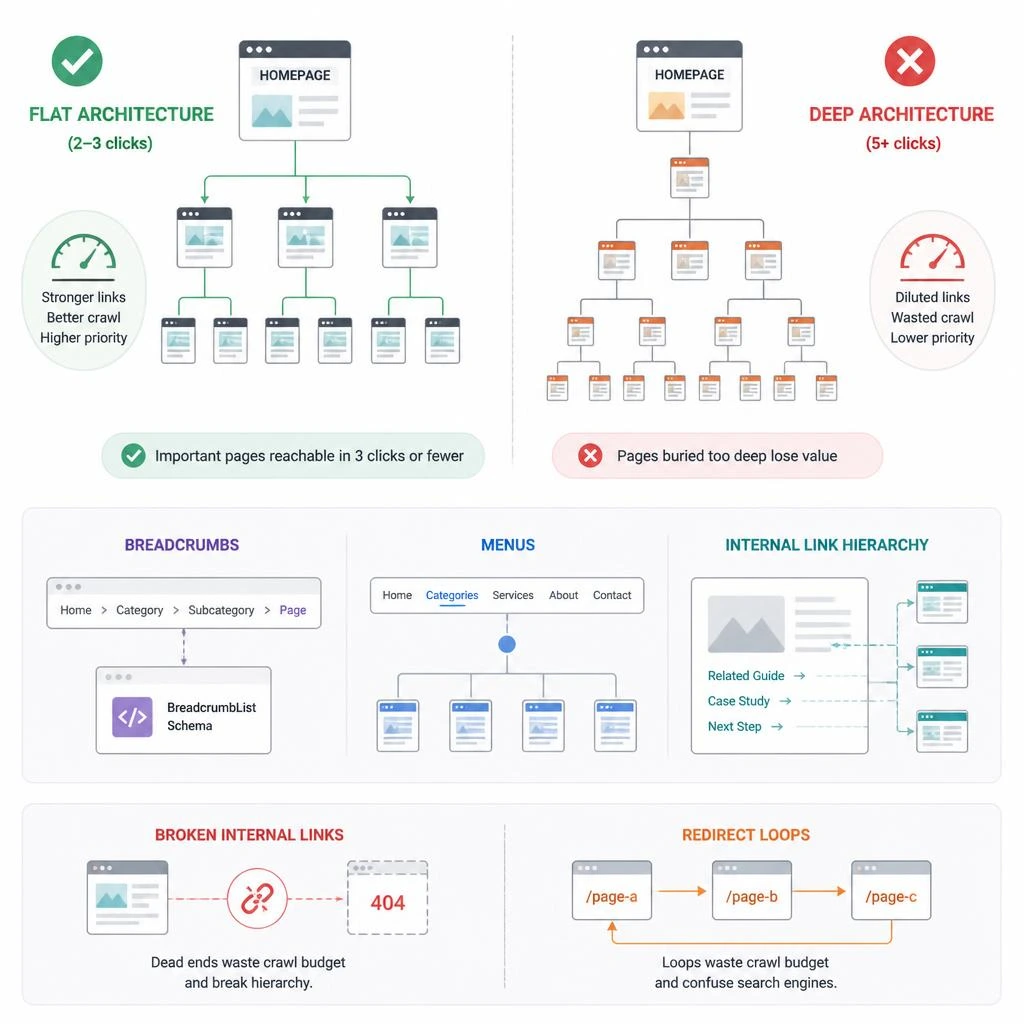
Flat vs. Deep Architecture – What 2026 Crawling Favors
Flat architecture means important pages are reachable within 2-3 clicks from the homepage. Deep architecture – where pages are buried 5+ clicks deep – dilutes crawl priority and link equity.
Practical rule: any page you want ranking competitively should be reachable from the homepage in 3 clicks or fewer, through either main navigation or contextual internal links.
Breadcrumbs, Menus, and Internal Link Hierarchy
Breadcrumbs aren’t just a UX nicety – they’re a structural signal that reinforces page hierarchy and, when marked up with BreadcrumbList schema, directly feed into how search engines understand your site’s architecture (covered fully in the Schema section below). Broken internal linking and improperly configured redirects are two of the fastest ways to quietly destroy this hierarchy — crawlers hit dead ends or get looped through unnecessary redirect chains, wasting crawl budget on pages that should be straightforward to reach. If you’re noticing redirect loops on your own site, our fix guide on resolving the ERR_TOO_MANY_REDIRECTS error covers the common causes and solutions.
Building Topical Authority via Silo Structures During Design
What a Content Silo Is (And Why It’s a Design Decision, Not Just a Content One)
A content silo is a grouping of related pages – a commercial “pillar” page surrounded by supporting informational content, all interlinked within the topic – that signals topical depth to search engines.
Here’s the part most guides miss: silo structure is determined at the IA (information architecture) design stage, not after content is written. If your navigation, URL structure, and template design don’t reflect the silo, no amount of internal linking afterward fully fixes it.
Mapping Service Pages → Pillar Content → Supporting Articles
Example Silo: Web Design → Speed Optimization → Troubleshooting Articles
/web-design-with-seo/ (pillar – this article)
/how-to-eliminate-render-blocking-resources-wordpress/
/image-seo-alt-text-file-names-guide/
/elementor-layout-broken-after-update-fix/
/how-to-fix-wordpress-critical-error-in-2026/
/elementor-mobile-menu-not-working/
/ (commercial destination)
Each supporting article should link up to the pillar (this guide) and across to closely related supporting articles where contextually relevant – never randomly, only where the topic genuinely overlaps.
URL Structure and Internal Linking Rules for Silo Integrity
- Keep URLs shallow and topic-descriptive
- Every supporting article should link back to its pillar at least once
- The pillar should link out to its top supporting articles within relevant sections (as done throughout this guide)
- Reserve the direct commercial link for early framing and the conclusion only, so informational intent isn’t disrupted mid-read
On-Page SEO Elements Designers Must Control
Title Tags, Meta Descriptions, and Header Tag Alignment
Title tags and meta descriptions are often left to whoever manages the CMS post-launch – but they should be planned during content/page design, especially the alignment between:
- The <title> tag
- The <h1>
- The primary keyword intent of the page
These three should be conceptually aligned without being identical strings, to avoid both keyword cannibalization and redundancy.
Alt Text and Image SEO as a Design-Stage Task
Alt text is frequently treated as an afterthought – filled in (or left blank) during a final pre-launch pass. It should instead be planned alongside image selection, since descriptive, keyword-relevant alt text serves three purposes simultaneously: accessibility, image search visibility, and contextual relevance signals for the surrounding content.
Formatting for AI Visibility and LLM Scannability (GEO)

Why AI Overviews and LLM Citation Need Different Formatting
Traditional SEO optimizes for ranking in a list of ten blue links. Generative Engine Optimization (GEO) optimizes for being extracted, summarized, and cited by AI Overviews, ChatGPT, Perplexity, and similar systems. The formatting requirements overlap with traditional SEO but aren’t identical.
LLMs tend to favor content that:
- Answers a question in the first sentence or two of a section, before elaborating
- Uses clear structural delimiters (headings, tables, lists) rather than long unbroken prose
- Provides self-contained, extractable chunks of information per section
Answer-First Paragraph Structuring
Instead of:
“When considering how websites perform, there are several factors that come into play, and one of the most important of these is…”
Use:
“Page speed is determined primarily by three factors: server response time, render-blocking resources, and asset size. Here’s how each one works.”
The second version gives an AI system (and a human skimmer) an immediately extractable answer, then earns the right to elaborate.
Using Tables, Lists, and Definition Blocks for Machine Readability
Tables in particular are heavily favored for extraction because they present discrete, structured data points rather than narrative prose. Every comparative or stepwise concept in this guide (the INP threshold table above, the checklist below) is intentionally structured this way.
Structured Data as an AI Visibility Signal
Beyond traditional ranking value, schema markup (covered fully below) increasingly functions as a direct signal to AI crawlers about entity relationships on the page – reinforcing what the page is about beyond what’s inferable from prose alone.
UX, Engagement, and Trust Signals
Visual Hierarchy and Cognitive Load Reduction
A page with strong visual hierarchy guides the eye naturally from headline to subheading to supporting content. Excessive competing visual elements – multiple font weights, colors, and animation styles on a single screen – increase cognitive load and measurably increase bounce rate.
Trust Elements: Reviews, Certifications, Author Bios (E-E-A-T)
Google’s E-E-A-T framework (Experience, Expertise, Authoritativeness, Trustworthiness) rewards pages that visibly demonstrate credibility:
- Author bio with relevant credentials, placed near the byline
- Genuine client reviews or case studies rather than generic testimonial carousels
- Clear, accessible contact and business information
Content Presentation & Readability
Scannable Formatting Patterns That Increase Dwell Time
- Short paragraphs (2-4 sentences maximum)
- Bullet points for any list of 3+ items
- Bolded key terms on first use within a section
- Tables for any comparative data
Whitespace, Typography, and Mobile Readability
Adequate line-height (1.5–1.6 for body text) and sufficient whitespace between sections reduce perceived density, which directly correlates with how long readers stay engaged rather than bouncing on first impression.
Designing for Conversions Without Sacrificing SEO

CTA Placement That Doesn’t Hurt UX or Crawlability
CTAs should be visually clear but not structurally disruptive – avoid injecting CTA blocks mid-paragraph in informational content, which breaks reading flow and is a primary reason competitor pages in this space suffer poor dwell time.
Forms, Page Speed, and Conversion-Rate Tradeoffs
Every third-party form embed adds JavaScript weight. Where possible, use native or lightweight form solutions over heavy third-party embeds, and ensure form validation doesn’t block main-thread responsiveness during input – directly tying back to the INP concerns covered earlier.
The Complete SEO Web Design Blueprint (Step-by-Step)
Step 1–6 Build Sequence
| Step | Action |
| 1 | Define your silo structure (pillar + supporting topics) before wireframing |
| 2 | Build the URL/IA hierarchy to reflect that silo |
| 3 | Apply semantic HTML templates across all page types |
| 4 | Implement the technical performance layer (INP, FCP, asset optimization) |
| 5 | Apply on-page and schema markup layer |
| 6 | Format key content sections for AI-search visibility (GEO) |
Downloadable/Copy-Paste Implementation Checklist
Pre-Launch SEO Web Design Checklist:
- Silo structure mapped before content creation begins
- Semantic HTML skeleton applied to page template
- Single <h1> per page, logical H2-H4 nesting
- INP tested under realistic interaction load (not just lab Lighthouse scores)
- Elementor/page-builder CSS audited for bloat and unused widgets
- Critical CSS inlined for above-the-fold content
- All images using loading=”lazy” (below-fold) or fetchpriority=”high” (LCP element)
- Modern image formats (WebP/AVIF) with explicit width/height set
- Mobile tap targets meet 48x48px minimum with adequate spacing
- Breadcrumbs implemented and marked up with schema
- Alt text written descriptively at the design stage, not post-launch
- Title tag, H1, and meta description aligned to primary intent
- Nested @graph schema implemented (WebPage + BlogPosting + BreadcrumbList)
- Key sections formatted answer-first for AI Overview extraction
Schema Markup: Building a Unified @graph Structure
Why Detached Schema Fragments Hurt Entity Recognition
Many sites implement schema as isolated, disconnected blocks – a BlogPosting schema here, a separate BreadcrumbList schema there, with no shared @id references tying them together. Search engines and AI crawlers can still read these fragments individually, but they miss the relational context: that this specific webpage is the container for this specific article, which is positioned at this specific point in the breadcrumb hierarchy.
The Nested @graph Model (WebPage + BlogPosting + BreadcrumbList)
json
{
“@context”: “https://schema.org”,
“@graph”: [
{
“@type”: “WebPage”,
“@id”: “https://rydesk.com/web-design-with-seo/#webpage”,
“url”: “https://rydesk.com/web-design-with-seo/”,
“name”: “How to Build a Web Design with SEO Strategy in 2026 (Full Guide)”,
“isPartOf”: { “@id”: “https://rydesk.com/#website” },
“breadcrumb”: { “@id”: “https://rydesk.com/web-design-with-seo/#breadcrumb” }
},
{
“@type”: “BlogPosting”,
“@id”: “https://rydesk.com/web-design-with-seo/#article”,
“mainEntityOfPage”: { “@id”: “https://rydesk.com/web-design-with-seo/#webpage” },
“headline”: “How to Build a Web Design with SEO Strategy in 2026 (Full Guide)”,
“author”: { “@id”: “https://rydesk.com/#organization” },
“publisher”: { “@id”: “https://rydesk.com/#organization” }
},
{
“@type”: “BreadcrumbList”,
“@id”: “https://rydesk.com/web-design-with-seo/#breadcrumb”,
“itemListElement”: [
{ “@type”: “ListItem”, “position”: 1, “name”: “Home”, “item”: “https://rydesk.com/” },
{ “@type”: “ListItem”, “position”: 2, “name”: “Web Design with SEO” }
]
},
{
“@type”: “Organization”,
“@id”: “https://rydesk.com/#organization”,
“name”: “RyDesk”,
“url”: “https://rydesk.com/”
}
]
}
Every block here references back to a shared set of @id anchors, turning four separate schema fragments into one connected entity graph – exactly the structural advantage a standard generic BlogPosting implementation lacks.
Conclusion
Web design and SEO stopped being separate disciplines years ago – treating them as sequential steps is the single biggest reason most business websites underperform in search, regardless of how polished they look.
The framework in this guide – semantic structure, INP-conscious design, silo-based architecture, and AI-search formatting – is the build process that actually holds up in 2026, not a checklist of outdated basics.
If you’d rather have this entire process – from silo planning to INP optimization to nested schema implementation – handled for you, that’s exactly what our WebsiteMaintenance Services are built around. And if you’d like to see the full range of what we offer, head over to our RyDesk to explore.
Got questions about implementing any part of this on your own site? Contact Us page – we’re happy to point you in the right direction.
Read Also:
Learn how to create an SEO Friendly Website Design to rank faster on Google.
FAQs
1.What is the difference between INP and FID?
FID only measured the delay before a browser began responding to the first interaction. INP measures the full response time of the worst interaction across the entire page visit, making it a far more accurate measure of real-world responsiveness.
2.Does Elementor hurt SEO?
Not inherently, but unoptimized Elementor sites commonly suffer from CSS/JS bloat, excessive DOM depth, and unused widget code – all of which can hurt page speed and INP if not actively managed.
3.What is a content silo in SEO?
A content silo is a structural grouping of a pillar page and its closely related supporting articles, interlinked to reinforce topical depth and authority on a specific subject to search engines.
4.How do I optimize a website for AI search visibility?
Structure content with answer-first paragraphs, use tables and lists for discrete data points, and implement clean structured data so AI systems can accurately parse what each page and section is about.
5.Why does my website load fast in Lighthouse but feel slow to users?
Lighthouse lab tests often miss real-world interaction delays. A site can have a fast initial load but still suffer from poor INP if JavaScript-heavy elements like sliders, popups, or forms block the main thread during actual user interaction.